
As we step into 2026, the landscape of iOS development is undergoing one of its most significant transformations in over a decade. At MartianCraft, we’ve spent years at the forefront of Apple platform development, and the convergence of technologies we’re witnessing today feels genuinely unprecedented. From Apple’s bold new design language to the democratization of on-device AI, from revolutionary improvements to Swift’s concurrency model to the maturation of spatial computing — this is a pivotal moment for anyone building applications in the Apple ecosystem.
This article explores the key technological advancements and emerging trends that have captured our attention, imagination, wants, and desires. Whether you’re a C-level executive evaluating technology investments, a product leader planning your roadmap, or a fellow developer eager to understand what’s coming, we hope this serves as both a practical guide and an invitation to share our excitement about what lies ahead.
Apple Intelligence
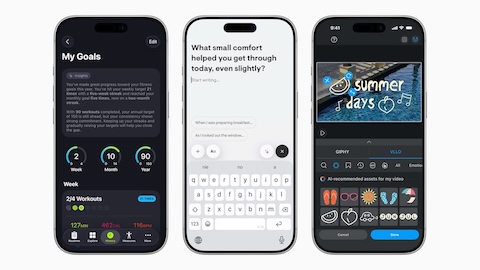
Last year, Apple worked to add Apple Intelligence throughout iOS 26, even going as far as opening up their on-device models to third-party developers through Foundation Models. This was a game-changer for so many applications, which can now implement artificial intelligence without relying on costly APIs and usage from Anthropic, Google, or OpenAI.
This opened the flood gates for apps to offer better AI solutions to end users, but many developers found these models to still be lacking. Some of the chief complaints with the local Foundation Models have been that it’s slow and that it can’t process the amount of data that you can do with specialized services.
Apple has solved these local Foundation Model challenges with their Private Cloud Compute system. This system was developed to integrate with Apple’s own LLM servers or partner APIs to process larger tasks that require more power — securely and without exposing user data. Of course, the local models were made available to developers, but the Private Cloud Compute integration is exclusive to Apple’s first-party apps, including the Shortcuts app.
We’re excited to see the work that Apple has done over the past year with the local models and their PCC models. We’re also hoping that Apple opens up their PCC models so that third-party developers can integrate with them with an API, even if it means that Apple charges for usage like they do with WeatherKit and other developer APIs and tools.
Siri
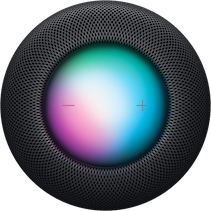
Siri was supposed to receive a major overhaul in iOS 26, but it seems that Apple has yet to deliver on that feature. Most recently we’ve seen that Apple is planning on partnering with Google to integrate their Gemini AI platform with Siri to process requests and beef up the reliability of the virtual assistant that has been on our iPhones since iPhone 4S.
As we look forward to this year, we’re hoping to see Apple deliver on this promise and actually make Siri improvements that show notable impacts to users and developers alike.
App Intents and the Promise of Real Integration
The evolution of App Intents represents one of the most significant opportunities for third-party developers to finally make their apps first-class citizens in the Siri ecosystem. With the App Intents framework, Apple provided the foundation for apps to expose their functionality in ways that Siri can understand and execute — but the developer experience and user discoverability remain challenging.
What we’re hoping to see this year is a more intelligent Siri that can actually reason about the intents our apps expose. Currently, users need to know the exact phrase or shortcut name to trigger many app-specific actions. With the integration of more capable language models, Siri should be able to understand natural variations and contextual requests. If a user says “show me my recent transactions” in a banking app, Siri should be smart enough to map that to the appropriate App Intent without requiring the user to memorize specific trigger phrases.
We’d also like to see improvements in how Siri handles multistep workflows that span multiple apps. The Shortcuts app has shown us what’s possible, but these workflows shouldn’t require manual setup for common tasks. Imagine Siri understanding “I’m heading to the gym” and automatically updating your workout app, adjusting your smart home settings, and queueing up your exercise playlist — all through intelligently chained App Intents.
Perhaps most importantly, we need better debugging and testing tools for App Intents. Currently, developers are working somewhat in the dark, unsure of how Siri will interpret their intents in practice. Apple could dramatically improve the developer experience with better Xcode integration, simulation tools, and analytics showing how users are actually trying to invoke our app’s functionality through Siri.
Liquid Glass Improvements
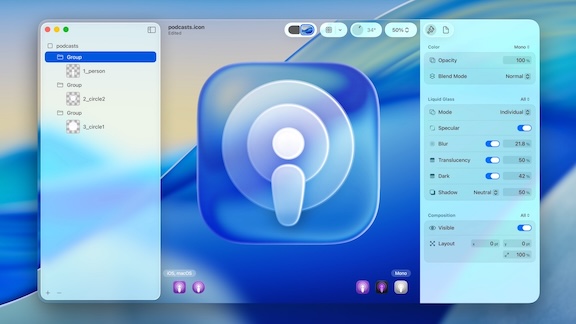
Liquid Glass was Apple’s biggest design changeover in iOS since iOS 7. It’s a very divisive design change: There are folks who absolutely love the design, and there are people who absolutely hate the design. Love it or hate it, we’re looking forward to stability with the new design in the same way we saw improvements to and stability in the iOS 7 redesign inside iOS 8.
The iPad Challenge
The iPad implementation of Liquid Glass has been particularly contentious, and for good reason. The larger canvas of the iPad exposes many of the design system’s growing pains in ways that the iPhone manages to hide. The translucent, flowing aesthetic that feels premium and spatial on a 6.1-inch screen can feel overwhelming and disorienting on a 12.9-inch display.
One of the primary challenges is information density. The iPad has always been about productivity and multitasking, but Liquid Glass’s generous spacing and emphasis on negative space often feels at odds with these goals. Many productivity-focused apps have reported that their iPad interfaces now show significantly less content per screen, forcing users to scroll more frequently. The beautiful glassmorphic cards and panels that define the design language consume substantial screen real estate, and on the iPad, this feels like a particularly wasteful trade-off.
The multitasking experience presents another set of complications. Split View and Stage Manager were already complex features to design for, but with Liquid Glass’s translucent layers and dynamic blurring effects, maintaining visual hierarchy and ensuring that interactive elements are clearly distinguished has become significantly more difficult. When two apps with Liquid Glass interfaces are side by side, the layered translucency can create a visual soup where it’s unclear which controls belong to which app.
We’re hoping that iOS 26 dot releases and iOS 27 and beyond will bring refinements specifically tailored to the iPad’s unique needs. This might mean more aggressive information density options, clearer visual separation in multitasking scenarios, or even context-aware adjustments to the Liquid Glass effects based on what the user is doing. Apple has historically been thoughtful about these kinds of platform-specific considerations, and we’re optimistic that they’ll continue to iterate on the iPad experience throughout the year.
We’d also like to see Apple provide better tools and guidelines for developers navigating these challenges. The current design resources don’t adequately address how to balance the aesthetic goals of Liquid Glass with the practical needs of information-dense applications. More comprehensive design patterns for tables, lists, and data-heavy interfaces would be invaluable.
Claude Code and Other LLM Agents
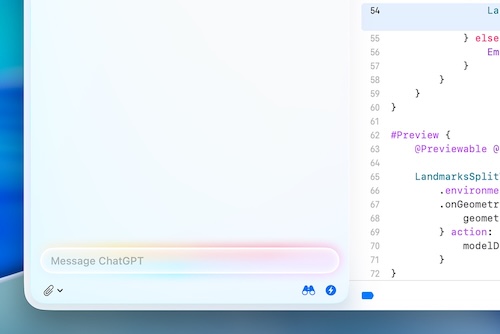
Over the past two years, LLMs have changed the way that we do development for iOS applications. There’s still a lot of improvement to go, but the landscape is changing right before our eyes.
The Swift and SwiftUI Gap
The promise of AI-assisted development has been tantalizing, but the reality for iOS developers has been more complicated than for our colleagues in web development or backend engineering. The fundamental challenge is that Swift and SwiftUI are relatively niche languages in the grand scheme of LLM training data. While there are millions of JavaScript and Python repositories to learn from, the corpus of Swift code — particularly modern SwiftUI — is substantially smaller.
This manifests in practical ways that slow us down daily. LLMs often suggest outdated patterns from the UIKit era when we’re working in SwiftUI. They hallucinate modifiers that don’t exist or combine them in ways that won’t compile. They’re particularly weak with Swift’s more advanced features, like result builders, property wrappers, and the newer concurrency model with async/await and actors. When working with cutting-edge APIs from the latest iOS releases, we frequently find ourselves correcting the model more than being assisted by it.
The challenges extend beyond code generation. iOS development has unique tooling, build systems, and deployment requirements that LLMs struggle to navigate. Xcode project configurations, build settings, provisioning profiles, and the intricacies of App Store submission are all areas where current AI assistants provide limited value.
A Changing Landscape
That said, we’re genuinely excited about the trajectory we’re seeing. Tools like Claude Code, GitHub Copilot, and cursor.ai are rapidly improving their understanding of Swift and SwiftUI patterns. We’re starting to see models that can handle more complex refactoring tasks, suggest appropriate architectural patterns for SwiftUI apps, and even help navigate the transition to Swift 6’s strict concurrency checking.
What’s particularly promising is the emergence of agentic coding assistants that can work more autonomously. Rather than just providing code snippets, these tools can understand broader project context, make cross-file changes, run tests, and iterate on their own output. For iOS development, this means an assistant that can update a view model, modify the corresponding SwiftUI view, adjust the navigation flow, and ensure everything still compiles — all from a natural language prompt describing what you’re trying to accomplish.
We’re also seeing interesting developments in multimodal LLMs that can understand design mockups and generate corresponding SwiftUI layouts. While the results aren’t production ready yet, the ability to go from a Figma design to a rough SwiftUI implementation in minutes rather than hours could fundamentally change how we approach prototyping and iteration.
Looking ahead to 2026, we’re optimistic that the combination of larger training datasets (as more developers adopt Swift and SwiftUI), more sophisticated models, and better integration with Apple’s development tools will narrow the gap between the AI-assisted experience in iOS development and other platforms. We’re particularly hopeful that Apple will embrace this trend and provide official APIs or tooling that help LLMs understand Xcode projects, access documentation more intelligently, and perhaps even integrate with the compiler to provide better error correction and suggestions.
The key is maintaining realistic expectations. LLM assistants are tools that augment our capabilities, not replacements for deep iOS development expertise. The developers who will thrive in 2026 are those who can effectively collaborate with these AI tools while bringing irreplaceable human judgment about architecture, user experience, and the subtle nuances that make iOS apps feel truly native and polished.
What are you most excited about in iOS development this year? We’d love to hear your perspective, continue the conversation, and build apps alongside your team. Reach out by contacting us here.