
Apple just did something wildly out of character.
On February 3, the company that rehearses Keynotes for months and guards product secrets like nuclear codes just … dropped a beta. No event. No Tim Cook. No “one more thing.” Just a surprise Xcode 26.3 release with features that weren’t even on the roadmap, complete with tutorials and an open invitation to try it now.
What’s inside? AI agents that can actually control Xcode.
Not “suggest the next line” AI. Not “autocomplete on steroids” AI. We’re talking AI that reads your entire project, understands your architecture, refactors dozens of files simultaneously, fixes bugs, writes tests, and interprets compiler errors — while you’re in a meeting.
You know that moment in sci-fi movies where someone says “Computer, fix the hyperdrive” and it just … does? We’re there. Except it’s “Claude, add Dark Mode support” — and your iOS app suddenly has Dark Mode.
Three weeks ago, this was science fiction. Today, it’s a beta download. Let’s talk about what just changed.
What is MCP?
Model Context Protocol (MCP) is an open standard created by Anthropic that allows AI models to securely connect to external tools, data sources, and applications. Think of it as a universal adapter that lets AI assistants like Claude interact with your development environment in a structured, safe way.
Instead of you copying and pasting code suggestions from a chat interface, MCP lets the AI actually interact with Xcode — reading your project files, understanding your app’s structure, running builds, and even making changes directly. It’s like having a knowledgeable pair programmer who can actually touch the keyboard.
MCP offers a powerful, standardized protocol for tool integration, surpassing traditional IDE plugins. Its client-server architecture, with Xcode as the MCP host and AI agents as clients with specific permissions, enables context-aware assistance that factors in your entire codebase, not just the open file.
MCP empowers AI to become a true development teammate, not just a code suggestion tool. Its standardization ensures consistent AI-assisted development across tools and continuous improvement as the ecosystem matures.
With Xcode supporting MCP, you don’t have to copy and paste code between the chat and your files; instead, the AI agent can take control of Xcode using data and context providers Apple has included.
What is Agentic AI?
Agentic AI refers to AI systems that can take autonomous action to complete tasks, rather than just responding to single prompts. An agentic AI can plan multistep workflows, use tools, make decisions, and iterate on solutions without constant human guidance.
Traditional AI code assistants are like having someone suggest the next line of code. Agentic AI is like delegating an entire feature implementation. You might say “Add dark mode support to this app,” and the agent will analyze your code, identify all the files that need changes, make those changes, test them, and fix any issues it finds — all with minimal supervision.
Agentic systems use reasoning and planning capabilities to break down complex tasks into subtasks, execute them using available tools (through MCP), evaluate results, and adjust their approach. In Xcode 26.3, this means the AI can navigate your project structure, analyze dependencies, run the compiler, interpret errors, search documentation, and iteratively refine its solutions. It’s particularly powerful for refactoring, fixing bugs that span multiple files, and implementing features that require coordinated changes across your codebase.
This represents a force multiplier for development teams. Rather than speeding up individual coding tasks by 20-30%, it can potentially handle entire features autonomously, allowing senior developers to focus on architecture and complex problem-solving while the AI handles implementation details. This could dramatically compress development timelines for certain types of work.
How Do I Set Them Up?
The first step is getting Xcode 26.3. As of the publication of this article, Xcode 26.3 has now been released publicly and is available from the Apple Developer Downloads (https://developer.apple.com/download/all/?q=Xcode) website or the Mac App Store (https://apps.apple.com/us/app/xcode/id497799835?mt=12).
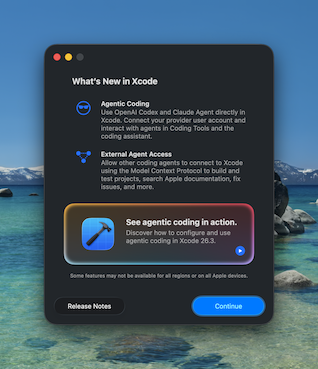
When you launch Xcode 26.3 for the first time, you’ll get the dialog above, giving you some information about the release and a video link to see more details (https://developer.apple.com/videos/play/tech-talks/111428).
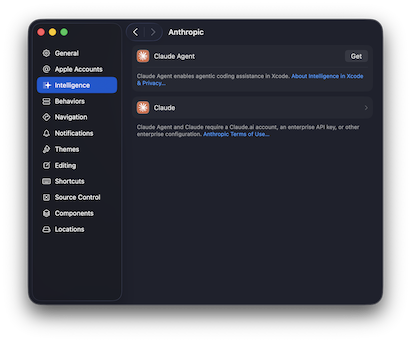
To get started with agentic AI development, go to Settings (Command+,), select Intelligence, then choose either the OpenAI or Anthropic provider. Click “Get” to download the models for interacting with Xcode for your provider. Next, you’ll need to authenticate with your provider.
You need a paid account with either OpenAI Codex or Anthropic Claude to use them with Xcode. If you have a subscription plan, it’ll utilize the usage available in your subscription first, then any API access you have allowed for your account.
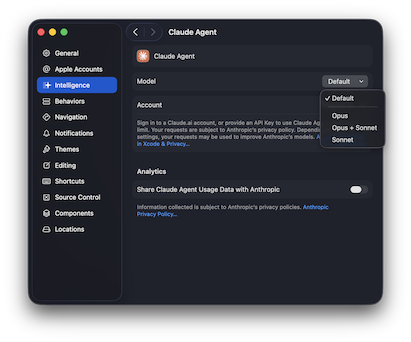
Once you’re signed in, you can also select the models that should be used for Xcode, if supported. For Anthropic, you can select between Opus, Opus + Sonnet, or just Sonnet. Opus is the highest reasoning model from Anthropic while Sonnet can give you a better cost to reasoning approach for smaller tasks that don’t require as much reasoning about the situation.
When you’re ready to begin, toggle the Coding Assistant by clicking the Intelligence icon in the left pane or by pressing Command+0.
The Coding Assistant has a message box at the bottom where you type your prompt and an attachment button that lets you attach an image for mockups or other visual aids that can help the model process your request. Type in a prompt, and it’ll jump into action. Thanks to the MCP integration with Xcode, Claude and Codex can really shine, interacting with the Xcode project fully: creating new files, refactoring efficiently, even making provisioning changes without you lifting a finger.
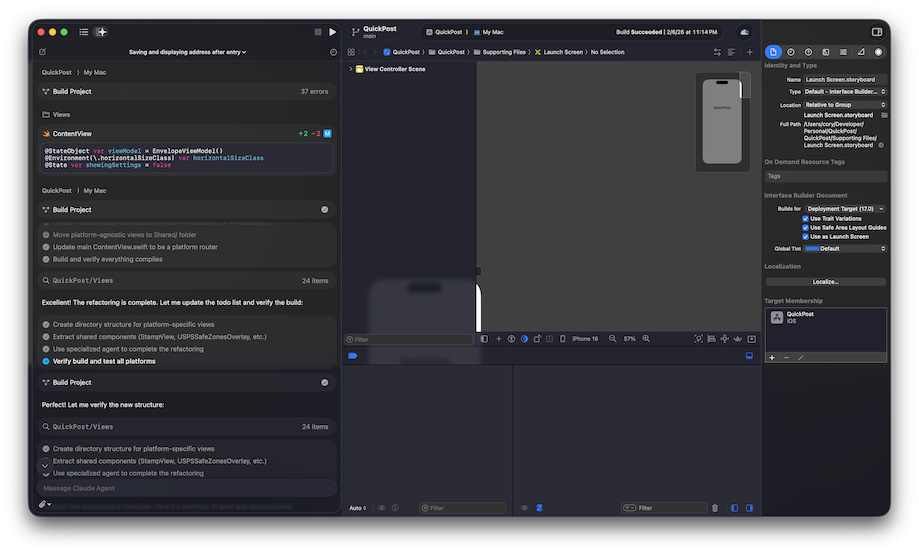
The best part is that you get rich in-line previews of code and SwiftUI previews — plus the app automatically builds itself, checks for errors, then fixes those errors, ensuring that when the agent is done, the app builds cleanly and is ready for manual or automated testing.
We really like the way Apple has integrated the Coding Assistant into Xcode and can’t wait to see what is next for Xcode and MCP integration. We think the best way to experience this is just to write prompts with it. So let’s take a look at how you can get started in your own iOS projects.
Writing Your First Prompt
The key to effective agentic AI development is learning to delegate tasks rather than micromanaging code generation.
Starter Prompts for Beginners
Start with contained, well-defined tasks:
“Add a new SwiftUI view called SettingsView with toggles for Dark Mode, notifications, and haptic feedback. Use the same styling as ProfileView.”
This gives the agent clear constraints and a reference point. The agent will:
- Create the new file in the appropriate location
- Implement the UI with proper SwiftUI patterns
- Match the styling you specified
- Update your navigation to include the new view, if needed
“Fix the memory leak in ContentView. The images aren’t being released when the view disappears.”
The agent will analyze your code, identify the leak source, and propose a fix.
Intermediate Prompts for Experienced Developers
Once you’re comfortable with the starter, you can delegate more complex work:
“Refactor the networking layer to use async/await instead of completion handlers. Maintain the existing error handling behavior and update all call sites.”
This is a tedious but straightforward refactoring that touches many files — perfect for an agent.
“The app is crashing when users rotate the device on the detail screen. Debug this and implement a proper solution.”
The agent will run the app in the simulator, reproduce the crash, analyze the stack trace, and implement a fix.
Advanced Prompts for Senior Developers
“Implement offline support for the entire app. Cache all API responses locally, sync changes when connectivity returns, and handle conflict resolution using last-write-wins strategy. Update the UI to show sync status.”
This is a multiday feature that the agent can break down into subtasks: setting up Core Data or SwiftData, implementing the sync engine, modifying all network calls, adding UI indicators, and testing various offline/online scenarios.
“Our test coverage is at 45%. Analyze the codebase and write unit tests for all ViewModels and service classes, aiming for 80% coverage. Focus on edge cases and error handling.”
The agent will examine your code, identify untested paths, and generate comprehensive test suites.
Best Practices
- Be specific about constraints: Clear directions like “Use SwiftUI, not UIKit” or “Don’t modify the existing database schema” help the agent stay aligned with your architecture.
- Reference existing patterns: Pointing to a file by name, like “Follow the same pattern as UserViewController,” tells the agent to maintain consistency.
- Iterate in conversation: If the first result isn’t quite right, you can refine, such as: “That works, but use Combine instead of async/await for consistency with the rest of the app.”
- Review everything: Agentic AI is powerful but not infallible. Always review changes before committing, especially for production code. Remember that you are the developer in charge, use the AI to your advantage and always feel free to prompt the AI in the same way you would a junior developer: If you want something done a specific way, be sure to tell it.
- Start small, scale up: Begin with low-risk tasks (like writing tests or documentation) before delegating critical features.
What This Means for iOS Development
For individual developers, Xcode 26.3’s agentic capabilities can eliminate much of the tedious work that slows down development — boilerplate code, refactoring, test writing, and bug hunting. This frees you to focus on what humans do best: creative problem-solving, user experience design, and architectural decisions.
For teams and organizations, this technology could significantly compress development timelines for certain types of projects, particularly those with well-defined requirements and established patterns. However, it also raises important questions about code review processes, testing strategies, and how to effectively manage AI-generated code at scale.
The real power of Xcode 26.3 isn’t that it makes AI write code faster — it’s that it makes AI a collaborative partner that can analyze your entire project context and can take meaningful action. Whether you’re a solo developer building your first app or a CTO managing a large iOS team, the agentic development paradigm is worth exploring.